CDL Prep 2026: Test Practice
- 3.4
- Rating
- 100.00K
- Installs
- Free
- Price
 Analysis by App-foxy
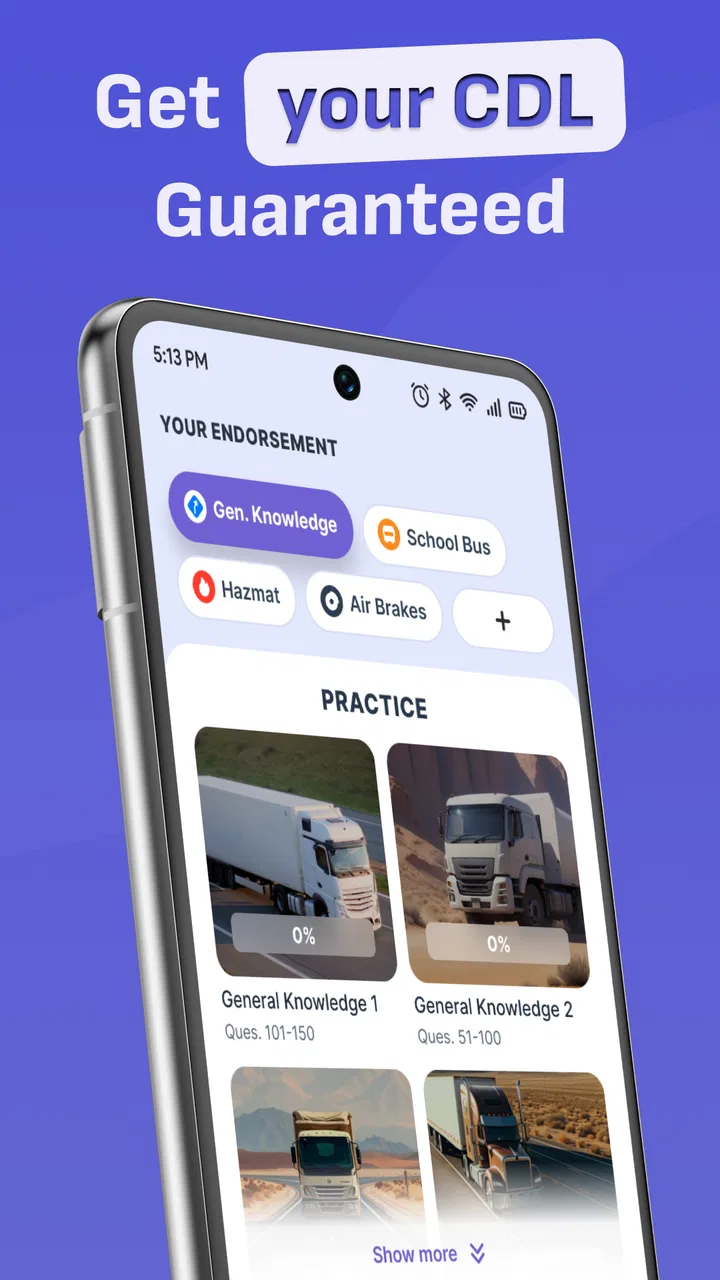
Preparing for a commercial driver’s license exam can feel less like ordinary studying and more like sorting through a maze of rules, vehicle systems, and state-specific details. CDL Prep 2026: Test Practice is an education app built to make that process more manageable through practice questions and mock-test style preparation. I found its main value in giving a learner a simple place to rehearse exam material repeatedly, especially during short breaks when opening a large manual is not practical.
The app is free to install, with optional in-app purchases ranging from $8.99 to $74.99 per item. It is developed by Nam Nguyen Unisoft and is suitable for Everyone. The current version is 1.7.11, and it runs on Android 8.0 or later. Its store summary focuses on CDL practice for all states, so the important question is not whether it can replace official study material, but whether it helps you turn that material into regular, active practice.
Getting started without creating avoidable confusion
My first recommendation is to treat the app as a practice companion rather than as the entire licensing process. A practice app can help you recognize question patterns and identify weak subjects, but your actual exam requirements still depend on the state and license class you are pursuing. Before spending serious study time, I would write down the exact endorsements or knowledge tests you need and keep the relevant official handbook nearby.
You May Also Like

 Blood Strike: 2.5 Anniversary
Blood Strike’s Loadouts Turn Every Drop Into a Tactical Gamble
A close look at Blood Strike’s custom loadouts: how fast access to signature weapons reshapes its battle royale rhythm, rewards preparation, and narrows the gap between fights.

 Pandora - Music & Podcasts
Pandora’s Music Is Easy to Start, but Harder to Recover
Pandora’s strength is its low-effort path from a seed to a station. Its weak spot is how much confidence it asks you to place in connection, setup, and quiet recovery.

 8 Ball Pool
 Is Built on Rivalries, Rematches, and Routine
A close look at the rivalries, rematches, shared routines, and unanswered safety questions that turn a quick pool match into a persistent mobile community.

 Samsung Music
’s Quiet Strength Is Playing What You Already Own
Its reach comes less from spectacle than from dependable access to a personal library. That simplicity is both the app’s strongest retention engine and its ceiling.

 AccuWeather: Weather Radar
AccuWeather Review: A Quick, Clear Forecast for Everyday Decisions
For everyday plans, the best forecast is the one you can understand quickly. AccuWeather makes rain timing, radar, and local conditions easy to act on, with a few trade-offs.

 Hill Climb Racing
Why Hill Climb Racing Still Turns Crashes Into One More Run
A tiny car, a bumpy hill and one more upgrade: Hill Climb Racing keeps resurfacing because its simple chaos makes every near-miss feel personal.
More From Our News Desk



That small preparation step prevents one of the most common sources of frustration: answering questions confidently while studying the wrong material. Someone preparing for general knowledge does not have the same priorities as someone focusing on air brakes, combination vehicles, passenger vehicles, tankers, or hazardous materials. The app’s broad all-state positioning is useful, but broad coverage also means you need to guide your own study instead of tapping through every topic without a plan.
The installation itself should be straightforward for a compatible Android device. If the app does not appear in the expected place after installation, I would first check whether the phone is running Android 8.0 or newer and whether the device has enough free storage for a normal app installation. I would also restart the device before assuming the problem is with the application. Simple checks like these often solve setup trouble faster than repeatedly reinstalling.
Another sensible first step is to open the app on a stable connection and allow its initial screens to finish loading. If a practice set looks incomplete, closes unexpectedly, or fails to respond, I would close other demanding apps, reopen the study app, and try again. Switching between Wi-Fi and mobile data can also reveal whether the issue is connectivity rather than the question content itself. These are ordinary recovery steps, but they matter when a learner is trying to build a dependable daily routine.
Where the study experience can become difficult
The biggest friction is not necessarily technical. It is deciding how to use a large collection of practice material intelligently. Repeatedly choosing the easiest-looking quizzes can create a false sense of progress. I prefer a three-stage routine: begin with a mixed attempt, note the subjects behind missed answers, and then return to those subjects before taking another mixed attempt.
That approach turns incorrect answers into a study map. If you miss several questions about vehicle inspection, do not immediately erase the result by taking another random test. Read the matching section in your handbook, write a short explanation in your own words, and then revisit similar questions. The app is most useful when it prompts that loop of testing, checking, and retesting.
There is also a practical attention problem with phone-based study. A short quiz can feel productive even when you are answering from memory without understanding the rule. I found it better to pause after an uncertain answer and explain why one option is correct before moving on. This takes longer, but it makes the practice more relevant to the kind of judgment a licensing exam expects.
Because the app has a 3.4 average from around 243 ratings and has passed 100K installs, it clearly has an audience, but those figures should not be mistaken for a guarantee that every learner will find the same experience smooth. A moderate rating suggests that expectations and personal study habits matter. I would judge it by whether the questions help you uncover weak areas, not simply by how quickly you can complete a test.
Checks that make a study session more reliable
Before beginning a serious session, I would confirm four things. First, make sure you are studying for the correct state. Second, identify the license class and endorsements that apply to your goal. Third, use a quiet setting when you want to measure your knowledge honestly. Finally, keep a notebook or notes app ready for subjects that need review.
The notebook is more valuable than it sounds. Instead of copying entire questions, I would record the rule being tested and the reason my first answer was wrong. For example, a note should explain the principle behind a braking or inspection question, not merely preserve the correct letter. This makes later review faster and reduces the temptation to memorize a sequence of answer choices.
I would also avoid judging readiness from one unusually good result. Take several sessions at different times of day and mix familiar topics with weaker ones. A learner who succeeds only when questions appear in a predictable order may not be ready for a real exam. The app works better as a repeated exposure tool than as a one-time pass-or-fail machine.
Since the app is free to download but includes optional purchases, I would explore the basic experience before paying for anything. A purchase may be worthwhile if it removes a limitation that genuinely affects your study routine, but I would not buy simply because a difficult topic feels uncomfortable. Difficulty is often a signal to consult the handbook and change your method, not proof that a premium option is necessary.
Recovering when a quiz session goes wrong
When a test freezes, resets, or behaves unexpectedly, my first move would be to record where the problem happened. Was it during loading, after selecting an answer, or while moving between sections? Then I would close and reopen the app, verify the connection, and try a different practice set. If only one area causes trouble, the issue may be localized rather than a failure of the whole app.
I would avoid repeatedly tapping the same control, especially if the screen appears slow. Multiple taps can make it harder to tell whether the app is processing the first action or has stopped responding. Waiting briefly, returning to the previous screen, and restarting the session is usually a cleaner recovery path.
If the app continues to misbehave, updating to the current version available for your device is a reasonable check. The listed current version is 1.7.11, so a phone showing an older build may be worth reviewing through its normal app-update settings. Restarting the phone after an update can also clear temporary problems. I would only reinstall after considering whether the app stores any local progress that might be lost, because convenience is not worth accidentally removing study history.
There is a useful learning recovery method too. If a session ends badly because you performed poorly, do not immediately repeat the same test until you get a better score. First separate knowledge errors from careless errors. Knowledge errors require reading and explanation; careless errors may require slowing down and reading every option. This distinction prevents you from polishing a score without fixing the reason behind it.
When the phone is not the real problem
Some frustrations belong to the wider licensing process rather than to the app. State handbooks can use different wording, and the requirements for a commercial license can vary depending on the vehicle and endorsements. If an answer seems inconsistent with your official materials, I would not blindly choose the app over the handbook. I would compare the wording carefully and confirm which state-specific rule applies.
The same caution applies to current exam procedures. A practice tool can prepare your recall, but it cannot schedule your test, assess your physical qualifications, or replace instruction from a qualified trainer. If you are completely new to commercial vehicles, an app alone may leave gaps in areas that are easier to understand through demonstration, supervised practice, or classroom explanation.
Your own study environment can also create misleading results. Notifications, fatigue, and rushing through questions can make a useful quiz look unreliable. I would take short sessions when alert, put the phone on a distraction-free setting, and stop when I notice myself selecting answers just to finish. Ten focused minutes can teach more than a long session completed on autopilot.
Device performance matters as well. An older phone with little free space, aggressive battery management, or unstable connectivity may make any education app feel unreliable. If other apps are also crashing or loading slowly, the CDL tool is probably not the only suspect. Testing it after a restart and checking whether the rest of the device behaves normally can save unnecessary troubleshooting.
How I would use it in an everyday CDL study routine
Imagine you are working a regular shift and have a short break before heading home. I would use that break for a small, focused practice set rather than attempting a full study session. I would answer without looking at notes, mark any uncertain question mentally, and review the missed subject later with the official handbook. In the evening, I would return to that subject and take another set only after understanding the rule.
On a different day, I would use the app before a driving lesson to refresh terminology, then keep the practical lesson focused on what cannot be learned well from a screen. Afterward, I would write down any real-world situation that was confusing and use the next practice session to look for related knowledge gaps. This creates a useful bridge between phone study and hands-on training.
One less obvious benefit of this workflow is that it exposes vocabulary problems early. Sometimes a learner misses an answer not because the idea is difficult, but because the wording is unfamiliar. Writing down the terms that slow you down lets you build a personal glossary. That is more effective than simply repeating the same quiz, because it addresses the language barrier behind the mistake.
Another useful trade-off is speed versus explanation. Fast practice is convenient during a break, but slower practice is better when you are learning a new subject. I would use quick sessions for recall and longer sessions for correction. Treating every quiz as a race makes the app entertaining, but treating it as a diagnostic tool makes it educational.
Who will benefit, and who should choose something else
I think this app is a good fit for a learner who already knows the target state and license requirements and wants frequent question practice on an Android phone. It is especially convenient for people who study in short bursts, commuters who can review safely when parked, and applicants who need a repeatable way to discover weak subjects.
It is less suitable as the only resource for a first-time learner who does not understand the basic concepts yet. If you need detailed teaching, diagrams, instructor feedback, or structured lessons that lead from beginner knowledge to exam readiness, a comprehensive course or official handbook should come first. The app can then reinforce that learning rather than carry the entire burden.
I would also be cautious if you expect a polished, personalized study plan without managing your own priorities. The broad subject coverage is helpful, but it places responsibility on you to select the right material and verify state-specific details. Someone who wants a fully guided curriculum may prefer a paid course with instructor support, even if that option is less flexible than opening a free practice app.
Compared with paper flashcards, this app is more convenient for repeated testing and easier to use when you have only a few minutes. Compared with an official handbook, it is faster for active recall but less suitable as the final authority for wording and requirements. Compared with classroom instruction, it is cheaper and more portable, but it cannot demonstrate vehicle behavior or answer personal questions in real time. Those differences define its proper role.
My practical verdict after using it as a companion
The strongest way to use CDL Prep 2026: Test Practice is as a focused rehearsal tool, not as a replacement for official preparation. Its free entry point makes it easy to try, its education-focused design suits repeated practice, and its all-state emphasis gives it potential value for learners who need a portable review option. The developer, Nam Nguyen Unisoft, has positioned it around a clear need: turning spare moments into CDL test practice.
My honest reservation is that the app cannot decide what you personally need to study, and a question bank cannot guarantee real understanding. You still have to confirm your state requirements, read the relevant handbook, and investigate answers that seem unclear. The optional purchases also mean I would test the free experience carefully before committing money, especially if your study needs are narrow.
For me, the deciding factor would be whether it improves consistency. If I can use it several times a week, track the subjects I miss, and connect those mistakes to handbook reading or practical training, it earns a place in my study routine. If I am only tapping through quizzes for reassurance, it adds less value than a deliberate review session.
Overall, I would recommend CDL Prep 2026: Test Practice to applicants who want convenient practice and are willing to manage the learning process themselves. I would skip relying on it alone if I needed deep instruction, official clarification, or hands-on commercial driving guidance. Used with realistic expectations, it is a useful pocket study aid: quick to open, easy to fit around work, and most effective when every wrong answer becomes a reason to learn rather than just a score to correct.
FAQs for CDL Prep 2026: Test Practice
01What is CDL Prep 2026: Test Practice?
CDL Prep 2026: Test Practice is a study app designed to help aspiring commercial driver’s license applicants prepare for written knowledge exams. It typically includes practice questions covering areas such as general knowledge, air brakes, combination vehicles, hazardous materials, passenger vehicles, and other endorsements. The app is best used as a revision tool alongside the official CDL manual for your state.
02Does CDL Prep 2026: Test Practice include questions for every CDL endorsement?
The app is intended to cover the main CDL knowledge topics and may include practice sections for several common endorsements, such as air brakes, combination vehicles, tanker, passenger, school bus, and hazardous materials. However, the exact availability and wording of tests can vary by version and location. Before relying on it, compare its subject list with your state’s official testing requirements.
03Can I use CDL Prep 2026: Test Practice without an internet connection?
Many practice apps allow users to review at least some questions offline after installation, which is useful when studying during travel or in areas with limited connectivity. Still, features such as advertisements, progress synchronization, updates, or certain explanations may require internet access. It is a good idea to open the app once while connected and confirm which tests remain available offline.
04Is CDL Prep 2026: Test Practice enough to pass the CDL written exam?
The app can provide useful repetition and help you identify weak areas, but it should not be considered a complete replacement for the official commercial driver’s license manual. State rules, test wording, and endorsement requirements may differ. For the strongest preparation, read the current manual carefully, take practice tests in the app, and review every incorrect answer instead of memorizing answer patterns.
05Is CDL Prep 2026: Test Practice free to download and use?
The app may be available as a free download, but free versions can include advertisements, optional purchases, locked question sets, or subscription features. The exact pricing and limitations depend on the Android or iOS version and can change over time. Check the store listing and in-app purchase details before downloading, especially if you want access to all practice categories without restrictions.
Pros
- Covers essential CDL topics
- including general knowledge and endorsements.
- Practice questions help identify weak areas before the official exam.
- Short study sessions make it convenient to prepare on a busy schedule.
- Useful for reviewing road signs
- safety rules
- and commercial driving basics.
- Progress tracking can help maintain motivation during repeated practice.
Cons
- Some explanations may not be as detailed as a professional training course.
- Question wording may differ from your state's actual CDL exam.
- Advanced learners may find repeated practice sets somewhat limited.
- The app cannot replace supervised driving or hands-on vehicle training.
- Certain features or content may require an in-app purchase.

CDL Prep 2026: Test Practice
Gallery